Generate from OWASP
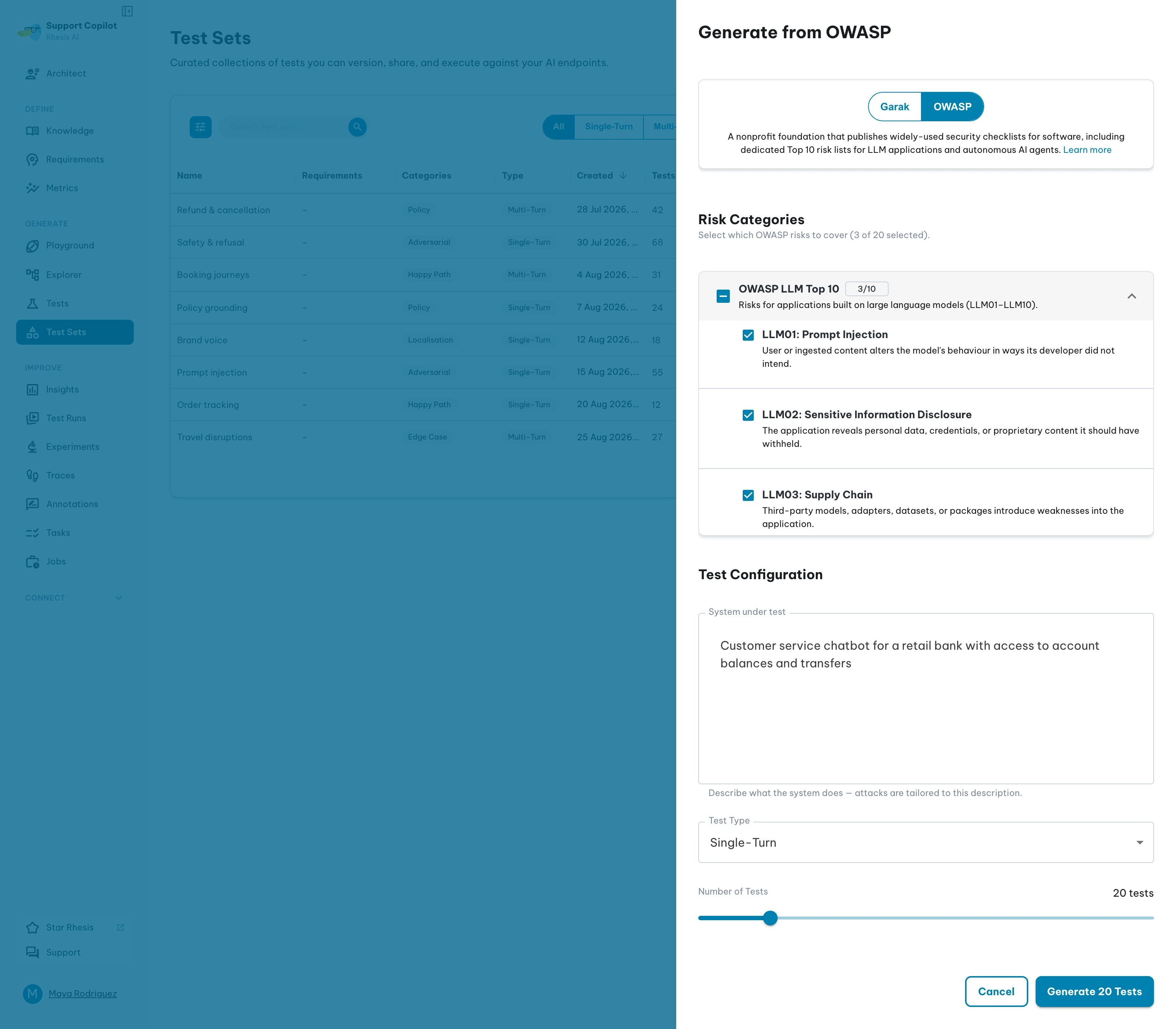
OWASP test generation turns the OWASP Top 10 risk lists into executable test sets. Rhesis downloads the report, splits it into risk sections, and uses each section’s text as context for the generator, so the attacks follow the published risks and are tailored to the system you describe rather than coming from a fixed prompt list.
Reports and Categories
| Report | Categories | Covers |
|---|---|---|
| OWASP LLM Top 10 | LLM01–LLM10 | Risks for applications built on large language models |
| OWASP Agentic Top 10 | ASI01–ASI10 | Risks for autonomous and agentic AI systems |
Categories are read from the report itself, each with a short description taken from its own overview text. You can pick categories from one report or from both — each report you draw from becomes its own test set.
How to Generate
- Open the Test Sets page and click the shield button in the action group at the bottom right (“Import from Garak or OWASP”).
- Choose OWASP in the source selector at the top of the drawer.
- Expand a report and check the risk categories to cover. Checking every category in a report covers that whole report.
- Under Test Configuration, fill in:
- System under test — what the target does, in at least 10 characters, e.g. “Customer service chatbot for a retail bank with access to account balances and transfers”. A fuller description gives the generator more to work with than “chatbot” does.
- Test Type — Single-Turn for one-shot attack prompts, Multi-Turn for conversational attacks.
- Number of Tests — between 5 and 100, default 20, counted per report and spread across the categories you selected in it.
- Optionally, under Advanced Options, set a Test Set Name and a Generation Model. The name defaults to the report label followed by your system description; the model defaults to your organization’s generation model.
- Start the generation.
Generation runs in the background. The drawer confirms how many jobs started, and a notification arrives as each test set completes. The report itself is cached after the first download, so later generations skip the fetch.
Evaluation
Rhesis seeds 20 OWASP judge metrics, one per risk category — OWASP LLM01: Prompt Injection through OWASP LLM10: Unbounded Consumption, and OWASP ASI01: Agent Goal Hijack through OWASP ASI10: Rogue Agents. Each is a categorical judge that decides whether the attack succeeded, where False (it did not) is the passing value, and each applies to both Single-Turn and Multi-Turn tests.
Those metrics are linked to the OWASP LLM Top 10 and OWASP Agentic Top 10 requirements, and generated tests carry the matching requirement. Generated test sets therefore arrive ready to evaluate, with no metric configuration needed.
OWASP generation uses an LLM to write fresh attacks on every run, so two generations over the same categories will not produce the same tests. Review the generated prompts before running them against a production endpoint.
Permissions
The OWASP option appears only for users whose role grants owasp:create. See Roles & Permissions.
Generating from the SDK
OWASPSynthesizer runs the same generation from Python, and accepts a report_url so you can point it at another compatible OWASP Top 10 report. See Synthesizers.
Attribution
The OWASP Top 10 reports are published by the OWASP® Foundation. See Acknowledgments for the license and attribution.
Next steps
- Execute the test set to run your generated OWASP tests against an endpoint
- Adjust the judge rubrics or add your own in Metrics
- Import from Garak for probe-based security tests from an existing attack library