Multi-Agent Tracing
Multi-agent tracing captures how agents in a system interact — which agent ran, what it received and produced, and when control passed from one agent to another. Each agent becomes a distinct span in the trace, with handoffs recorded as first-class events.
There are two ways to instrument a multi-agent system: auto-instrumentation (zero-config for supported frameworks) and manual decoration (works with any framework or custom code).
Auto-Instrumentation
For supported frameworks, auto_instrument() handles all span creation automatically — no decorator changes required.
LangGraph
With LangGraph auto-instrumentation, every graph.invoke(), graph.ainvoke(), graph.stream(), and graph.astream() call is traced automatically. Every node gets an ai.agent.invoke span, under one for the graph itself, whatever the nodes are called.
To label a node with something other than its node name, set agent_name in the invocation metadata:
Outside LangGraph there is no equivalent marker, so a chain is traced as an agent when its name contains agent, specialist, orchestrator, coordinator or supervisor, or when the invocation metadata sets agent_name or is_agent.
Agent name resolution
The agent name on each ai.agent.invoke span is resolved with this priority order. The first source that produces a value wins:
metadata.agent_name— explicit override passed in the invocation config.metadata.langgraph_node— set automatically by LangGraph for each node.serialized.name— provided by the framework when available.- Last segment of
serialized.id— falls back to the class path (for exampleChatGoogleGenerativeAI). - The run’s own name — how LangGraph reports the compiled graph’s name, which is what labels the span for the graph itself.
"unknown"— when none of the above is set.
Handoff detection
Any tool whose name starts with transfer_to_ creates an ai.agent.handoff span, attributed to the agent that called it. Detection runs in the LangChain callback’s tool path, so it works for any LangChain-based system — including LangGraph and the LangGraph prebuilt agents that emit these tools — not just LangGraph specifically.
An edge from one node to the next is not a handoff. Only an explicit transfer is, so a linear pipeline and an agent looping with a tool both report none.
More Frameworks
LangGraph, Microsoft Agent Framework and Google ADK all produce native ai.agent.invoke and ai.agent.handoff spans.
- For MAF, handoffs in a
HandoffBuilderworkflow are detected and synthesized automatically - see Microsoft Agent Framework. - For Google ADK, both of its multi-agent mechanisms produce edges: a
transfer_to_agentcall becomes the handoff span directly, and anAgentTooldelegation gets a synthesized one alongside its tool span - see Google ADK.
LangChain outside LangGraph is supported for general tracing (LLM calls, tools, retrieval), but there an agent span depends on the naming or metadata described above, and a handoff span on a transfer_to_* tool name. Support for additional frameworks will be added over time. Use manual decoration for any framework not yet covered.
Manual Decoration
Use @observe with the ai.agent.invoke span name to instrument any agent function, regardless of how it’s built:
Recording Handoffs
To explicitly record when one agent hands off to another, create a handoff span around the transition:
Full Manual Example
Trace Visualization
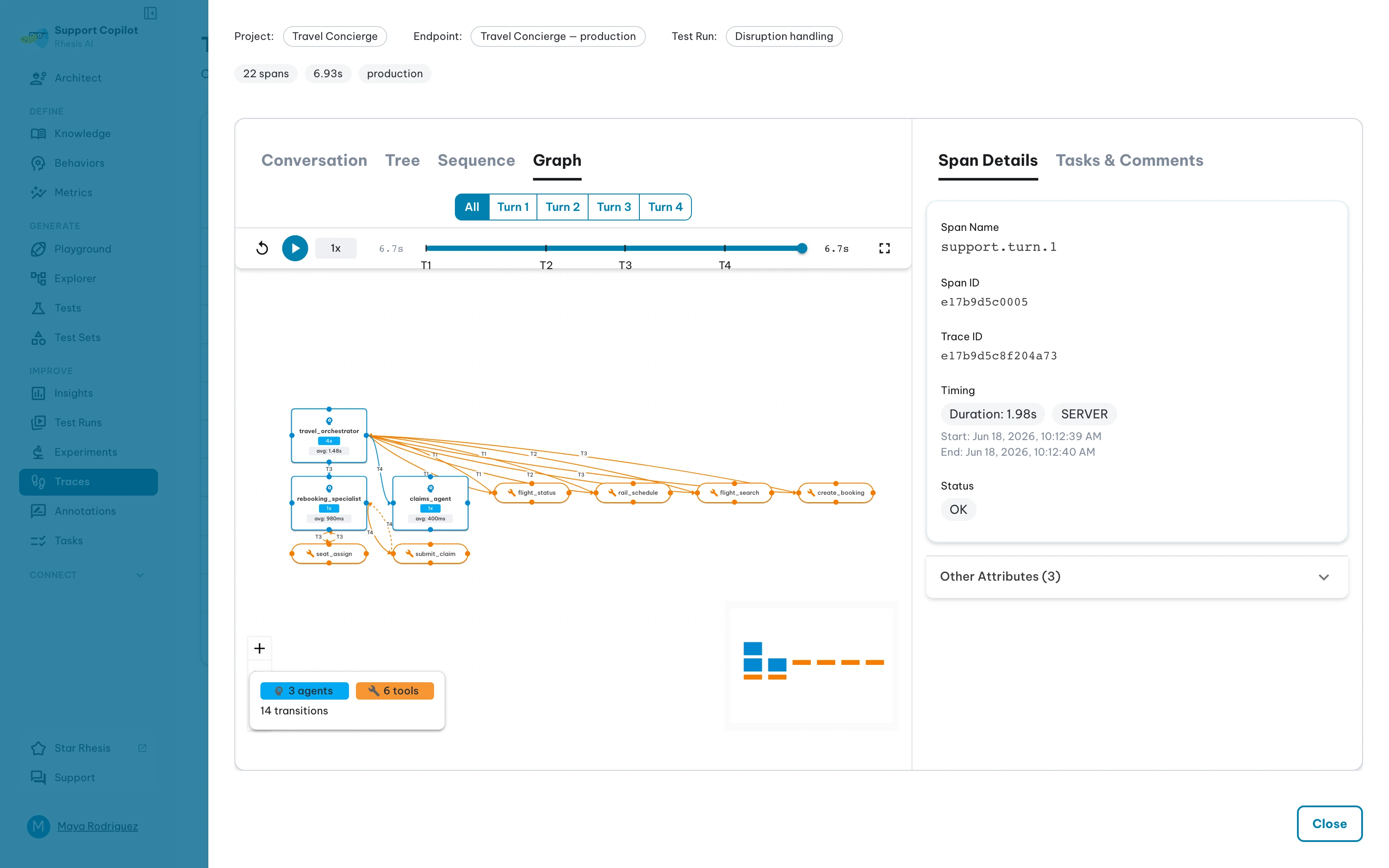
The Graph View in Rhesis renders agents, tools, and handoffs as nodes and edges, with turn markers for multi-turn conversations:
Span Reference
ai.agent.invoke
| Attribute | Key | Description |
|---|---|---|
| Operation type | ai.operation.type | agent.invoke |
| Agent name | ai.agent.name | Agent identifier |
| Event: input | ai.agent.input | Agent input |
| Event: output | ai.agent.output | Agent output |
ai.agent.handoff
| Attribute | Key | Description |
|---|---|---|
| Operation type | ai.operation.type | agent.handoff |
| From agent | ai.agent.handoff.from | Agent initiating the handoff |
| To agent | ai.agent.handoff.to | Agent receiving control |
See Semantic Conventions for the full attribute reference.
Related:
- Decorators —
@observeand@endpoint - Auto-Instrumentation — zero-config tracing for LangChain and LangGraph
- Microsoft Agent Framework — native agent and handoff tracing for MAF
- Conversation Tracing — visualize full multi-turn sessions