Parameter Schema
A parameter schema declares the typed knobs your project supports — what can be configured, not what the values are. Experiments fill in the values.
Why start with a schema?
Before you can create your first experiment, your project needs a schema. The schema defines the configuration surface of your application: what parameters exist, what types they have, and what their defaults are.
Without this contract in place, there’s nothing for experiments to fill in. Think of the schema as the blank form and experiments as the filled-in copies.
Production LLM applications have many knobs: system prompts, model selections, sampling temperatures, retrieval strategies, and evaluation thresholds. Parameter schemas give these knobs a typed, versioned home — the whole behavioral surface of your LLM application, not only its prompts.
The schema as a contract
Your project’s Parameter Schema declares the shape of every experiment in that project. It acts as a strict contract between your application code and your configuration layer.
Because it serves as a contract, there is only one schema per project, not per experiment. Adding a slot to the schema is a non-breaking change (existing experiments simply lack the new key), but renaming or removing a slot must be treated carefully since application code may still expect it.
Renaming parameters: Renaming a slot in the schema is not auto-migrated. The recommended workflow is: add the new field, dual-read both fields in your application code, update your experiments to populate the new field, and finally remove the old field from the schema.
Supported parameter types
| Type | Description | Example | UI Input |
|---|---|---|---|
text | Multi-line text block. Use this for system prompts, context templates, and long-form instructions. | "You are a helpful assistant..." | Multi-line textarea |
string | Single-line identifier. Use this for model names, IDs, or short text. | "vertex_ai/gemini-2.0-flash" | Single-line input |
number | Floating point numeric value. Use for temperature, thresholds, etc. | 0.7 | Numeric input |
integer | Whole number value. Use for token limits, retry counts, K-values. | 1024 | Numeric input |
boolean | True/false toggle. Use for feature flags or boolean behaviors. | true | Switch / toggle |
enum | Closed set of string options. | "travel" (from ["travel", "medical"]) | Dropdown select |
model_ref | Reference to an LLM model configured in Rhesis. | "550e8400-e29b-41d4-a716-446655440000" | Model autocomplete |
secret_ref | Reference to a secure credential. Masked in UI. | "f47ac10b-58cc-4372-a567-0e02b2c3d479" | Secret picker |
Defining the schema
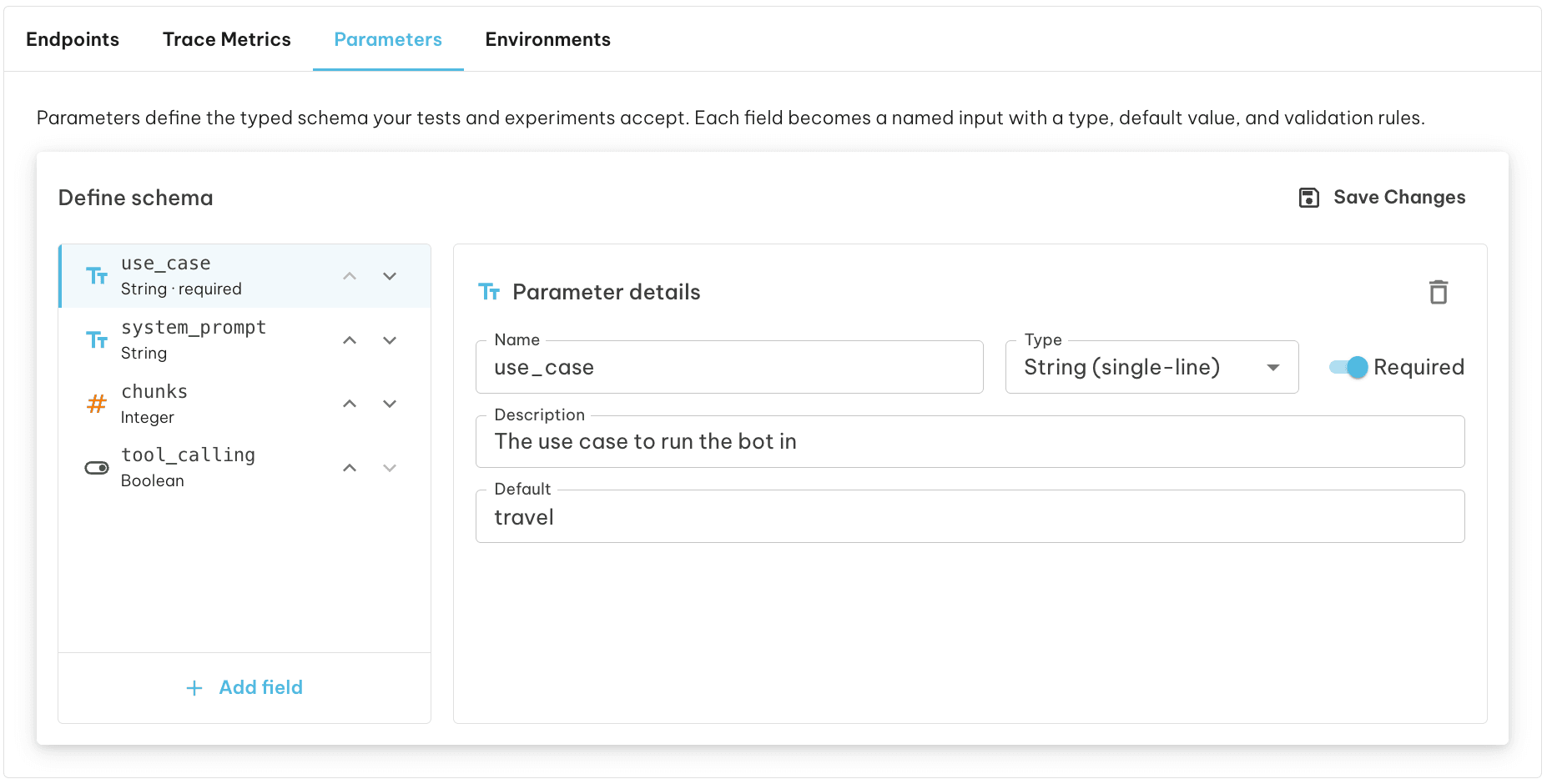
To define your schema, navigate to your Project page and select the Parameters tab. Use the list editor to add parameter slots. For each slot:
- Provide a
snake_casename. - Select the parameter type.
- (Optional) Provide a default value.
- If you selected
enum, provide the allowed options. - Click Save to update the project schema.
Using parameters in code
Once your schema has values (via an Experiment), your application reads them with a single call:
See SDK Usage for the full Parameters.get() API, including caching and environment resolution. For managing schemas programmatically, see SDK Parameters.
Next steps
Once your schema is defined, you’re ready to create experiments that fill it in:
- Experiments — Learn the full lifecycle: authoring, versioning, promoting, and resolving configuration.
- SDK Experiments — Author and manage experiments programmatically.
- SDK Usage — Read parameter values in your application code with
Parameters.get().