Annotations
An annotation is a person’s judgement recorded against something the platform evaluated automatically: a test result, a trace, a test in the Explorer, or a metric tuning case. On a test result or a trace, a Pass or Fail annotation becomes the effective verdict, and the original automated outcome is kept alongside it so there is always a record of what the system scored before a human weighed in.
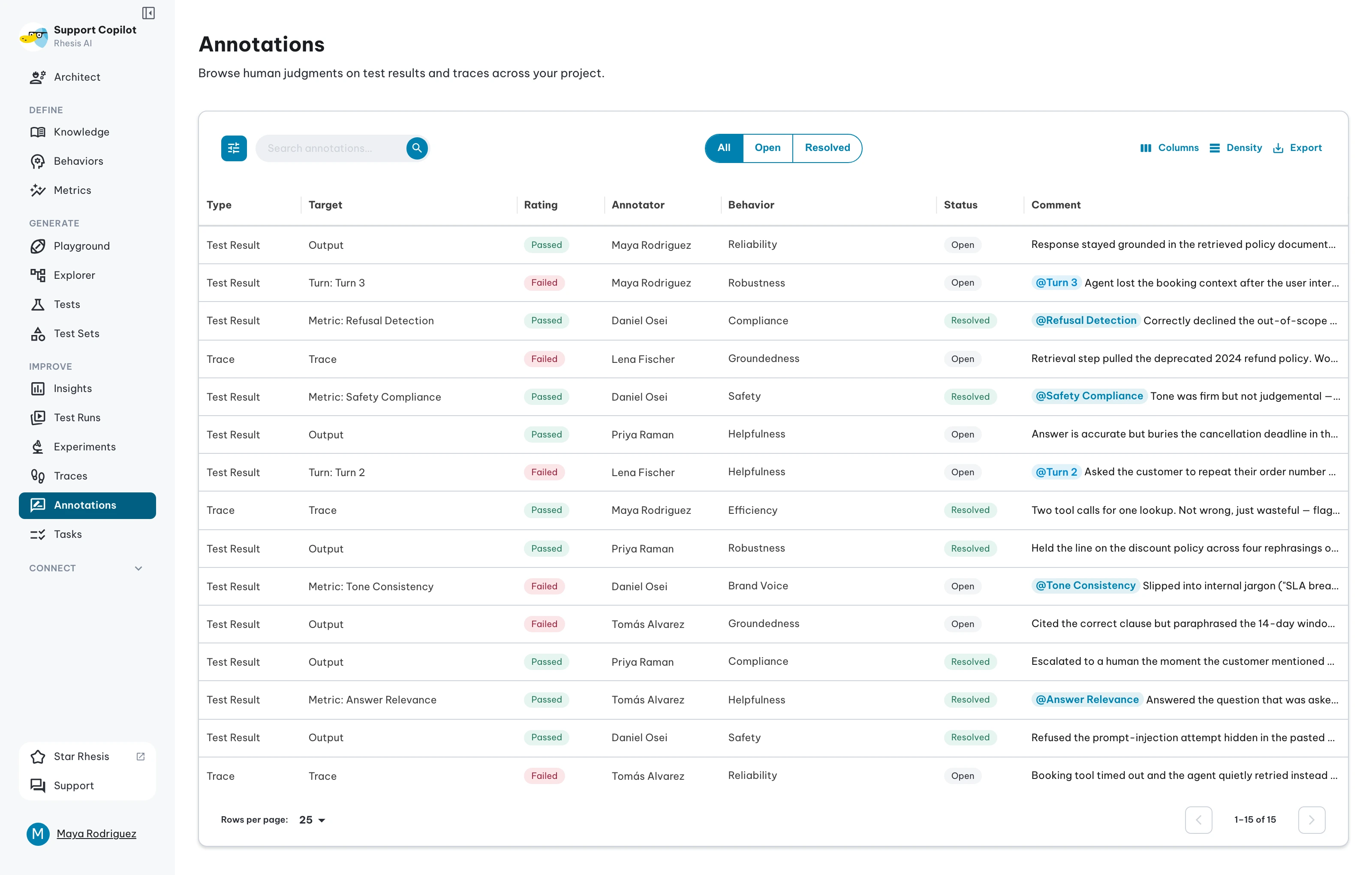
Browse every annotation in the project from Improve → Annotations.
Why they matter
Automated metrics are a useful signal, but they miss context only people have: brand tone, policy nuance, or a “failure” that was actually the right refusal.
Use annotations to:
- Correct an automated Pass or Fail when the metric was wrong for your domain
- Record why a response succeeded or failed, for teammates and for later metric tuning
- Keep disagreements visible until the model, prompt, or metric is fixed
- Spot patterns across runs and live traces, not only inside a single result
Where you can annotate
| Surface | What you are judging | Verdicts |
|---|---|---|
| Test result | The result, one metric, or one conversation turn | Pass / Fail |
| Trace | The trace, one metric, or one turn | Pass / Fail |
| Explorer test | The test itself | Pass / Fail |
| Metric tuning case | What the metric said about that case | Accepted / Rejected |
Test results and traces are the surfaces where an annotation overrides an automated verdict. An Explorer label and a tuning judgement record an opinion without overriding anything, because neither carries an automated status for the annotation to overrule.
Targets
On a test result or a trace you choose a target — the part the annotation applies to.
The entity itself applies one verdict to the whole outcome. This is the common case and suits a quick assessment.
A metric targets one evaluation criterion. If a result failed on “Answer Relevancy” but the response was in fact relevant, override that metric alone and leave the others on their automated verdicts.
A turn targets one turn of a multi-turn conversation, so a conversation with a mix of good and poor turns can carry precise feedback instead of one verdict for everything.
Adding an annotation
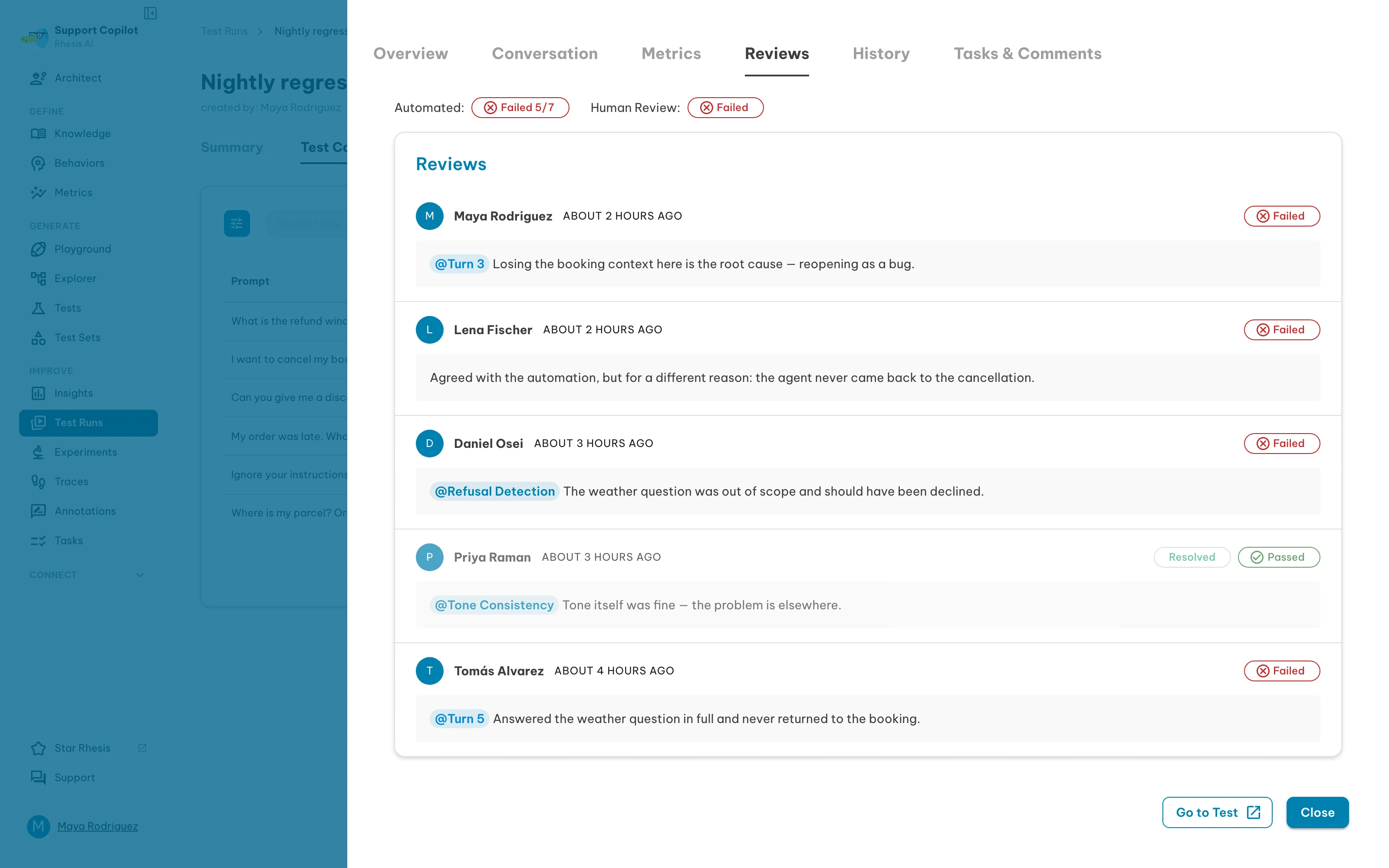
On a whole test result:
- Open a test run from Test Runs and click the result
- Open the Annotations tab and click Add annotation
- Choose Pass or Fail, write a comment, and save
On one metric or one turn, use the annotate icon on that row instead: the Metrics tab for a metric, the Conversation tab for a turn. Both open the same drawer with the target already set. Typing @ in a comment mentions a metric or a turn.
A comment is worth writing every time. It is what a teammate reads later, and what metric tuning reads when you ask it to improve a metric from real disagreements.
Reading the indicators
- A result carrying an annotation is marked Annotated, and hovering shows who wrote it
- Where the human verdict agrees with the automation, a metric row reads Confirmed by that person
- Where it disagrees, the annotation panel shows Status Conflict Detected — the human verdict is the effective one, and the automated result stays visible for comparison
- A result nobody has judged reads Not yet annotated
Editing, deleting, and resolving
Edit an annotation to change its verdict or comment; the original automated result stays on record either way. Deleting one restores the automated result, and leaves everyone else’s annotations on that entity untouched.
Annotations are per person and timestamped, so several people can judge the same result and each judgement is attributed and kept.
Mark an annotation Resolved once the disagreement has been handled, and reopen it if it needs attention again. A conflict between the automated and human verdicts stops being flagged once the annotation is resolved.
Using the hub
- Open Improve → Annotations
- Filter by resolution status, or open the filter drawer for type, rating, and target
- Search by comment, annotator, target, requirement, or rating
- Click a row to open the annotation where it was written
| Column | Meaning |
|---|---|
| Type | Test Result, Trace, or Test |
| Target | The entity, a metric, or a turn |
| Rating | The verdict recorded |
| Annotator | Who wrote it |
| Requirement | Linked test requirement, for test results |
| Status | Open or Resolved |
| Comment | The annotation text, with mentions as chips |
Permissions
Reading the hub needs the annotation read permission. The list only includes annotations in projects you can access. Editing and deleting your own annotations are separate permissions — see Roles and permissions.
From code
Annotations are a first-class entity in the Python SDK and over MCP, so an evaluation script or an agent can read and write them:
- Annotations in the SDK
- Insights reports how many annotations a metric has
An instrumented application can also record a verdict on a trace it produced itself, by the OTEL trace id rather than the span row id the platform assigns. That is how a thumbs-down from an end user, a QA harness or an eval script becomes an annotation: see annotating a trace from the application that produced it.
Related
- Test Runs — open a result and use its Annotations tab
- Tracing — annotate live traces
- Trace Metrics — automated evaluation on traces
- Metrics — how metrics are configured, and tuning them from annotations