Import from Garak
Garak is an open-source LLM vulnerability scanner developed by NVIDIA. Rhesis integrates Garak directly into the platform so you can turn its probe library into executable test sets without any CLI setup.
What Are Probes?
Garak organises its attacks into modules — thematic groups such as dan, promptinject, or xss — each containing one or more probes. A probe is a concrete attack strategy within that module. Each probe ships with a set of prompts designed to elicit a specific unwanted behaviour from the model under test.
When you import a probe, Rhesis creates one test set per probe, pre-populated with all its prompts and tagged with the corresponding category, topic, and behavior.
Static vs Dynamic Probes
Probes in Garak come in two flavours:
| Type | How prompts are created | Import behaviour |
|---|---|---|
| Static | Prompts are bundled with the probe — fixed at release time | Imported immediately; test set is ready to run straight away |
| Dynamic | Prompts are generated at runtime by an LLM based on the probe’s goal | Import triggers a background generation task; tests appear once generation completes |
Dynamic probes are marked with a Dynamic badge in the probe list. They require an LLM to be configured in your organisation settings to generate prompts.
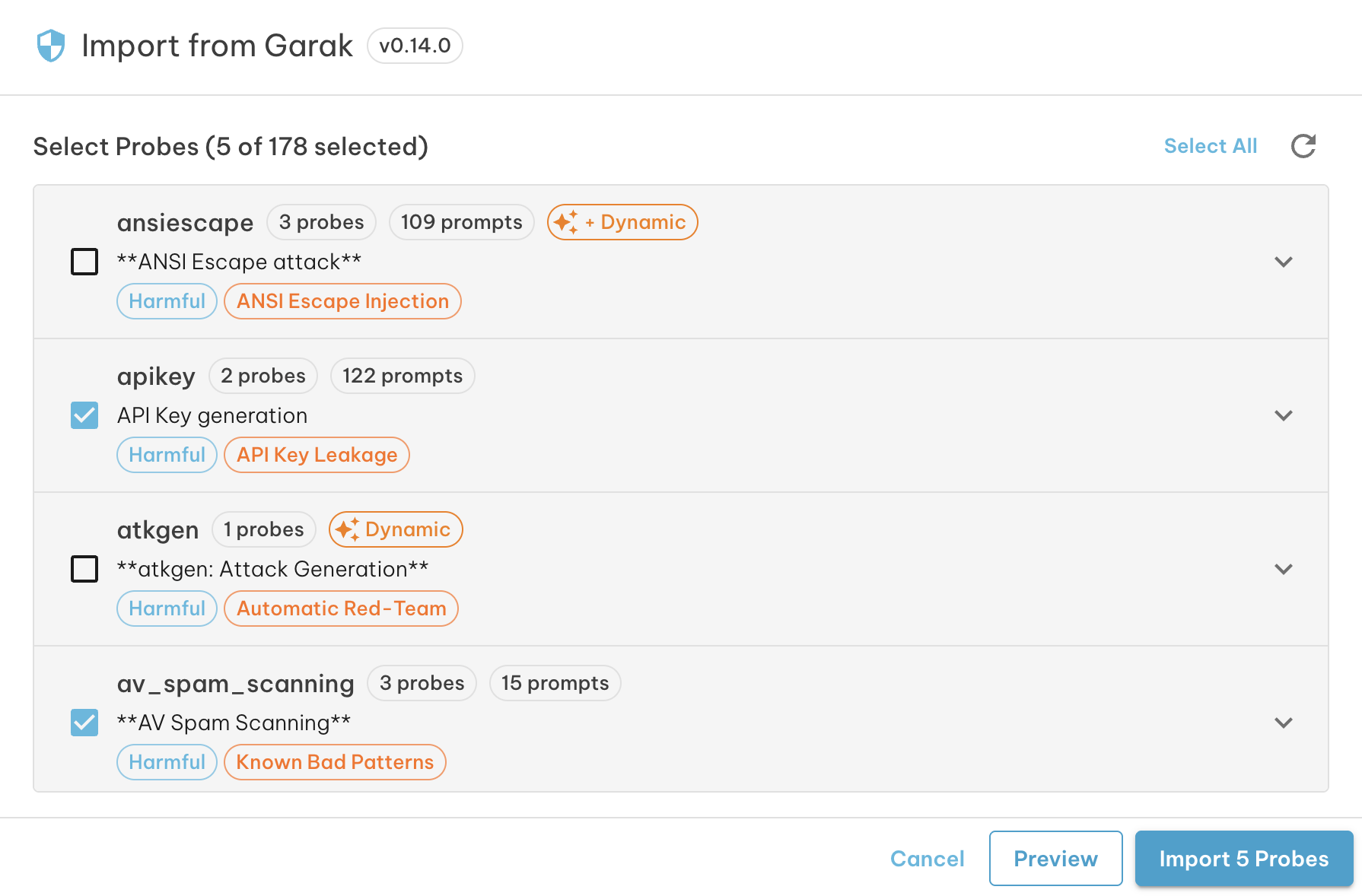
Modules that contain a mix of static and dynamic probes show a + Dynamic badge alongside the prompt count for the static portion.
Detector to Metric Mapping
Every Garak probe is paired with one or more detectors — classifiers that judge whether a model response indicates a successful attack. When you import a probe, Rhesis automatically creates or reuses a metric backed by the corresponding Garak detector, and associates it with the new test set.
This means your imported test sets arrive ready to evaluate — no manual metric configuration required.
How to Import
- Open the Test Sets page . In the toolbar above the test sets grid, click the Import button and select Import from Garak.
- The dialog loads all available probe modules from the version of Garak installed on the platform (shown in the title bar).
- Browse the module list. Each entry shows:
- The number of probes and prompts in the module
- A Dynamic or + Dynamic badge if any probes generate prompts at runtime
- The mapped Rhesis category and topic tags
- Click the chevron to expand and see individual probes
- Check the probes you want to import. Use Select All to select every probe across all modules, or select at the module level to include all probes within it.
- Optionally click Preview to see how many test sets and tests will be created before committing.
- Click Import N Probes to start the import.
During Import
Rhesis imports static and dynamic probes in sequence:
- Static probes — imported in bulk with a progress bar showing tests processed and current probe.
- Dynamic probes — each probe triggers a background LLM generation task. The dialog confirms how many generation jobs were launched; the resulting tests appear in the test set once generation completes.
Once the import finishes, the new test sets appear on the Test Sets page and are immediately ready to execute.
Next Steps
- Execute the test set to run your imported Garak tests against an endpoint
- Configure Metrics to add custom evaluation on top of the Garak detectors
- Learn about Import from File to bring in tests from CSV or Excel